
Multichat
Dieser Inhalt ist noch nicht in deiner Sprache verfügbar.
One world, separate histories
Section titled “One world, separate histories”A group chat gives every character one shared conversation. They receive the same history, stand in the same sequence of events, and usually know what happened to everyone else.
Multichat lets one story continue through several separate chats. Each character, group, or location can have its own history and its own context. Events in one storyline stay there until the story actually connects them.
When two characters meet, their existing histories can be brought together for that scene. The meeting itself can become one event shared by both chats. When they part, each storyline can continue separately while both histories keep the encounter.
For example, one chat can follow a baker opening her shop while another follows a traveler entering the city. Their private events remain in their own chats. A Virtual Chat brings both histories into the order in which they happened, and their meeting at the bakery becomes part of both histories.
This is the main idea of Multichat: one world can contain several independent storylines without giving every character the same conversation or the same knowledge.
How TavernAI represents it
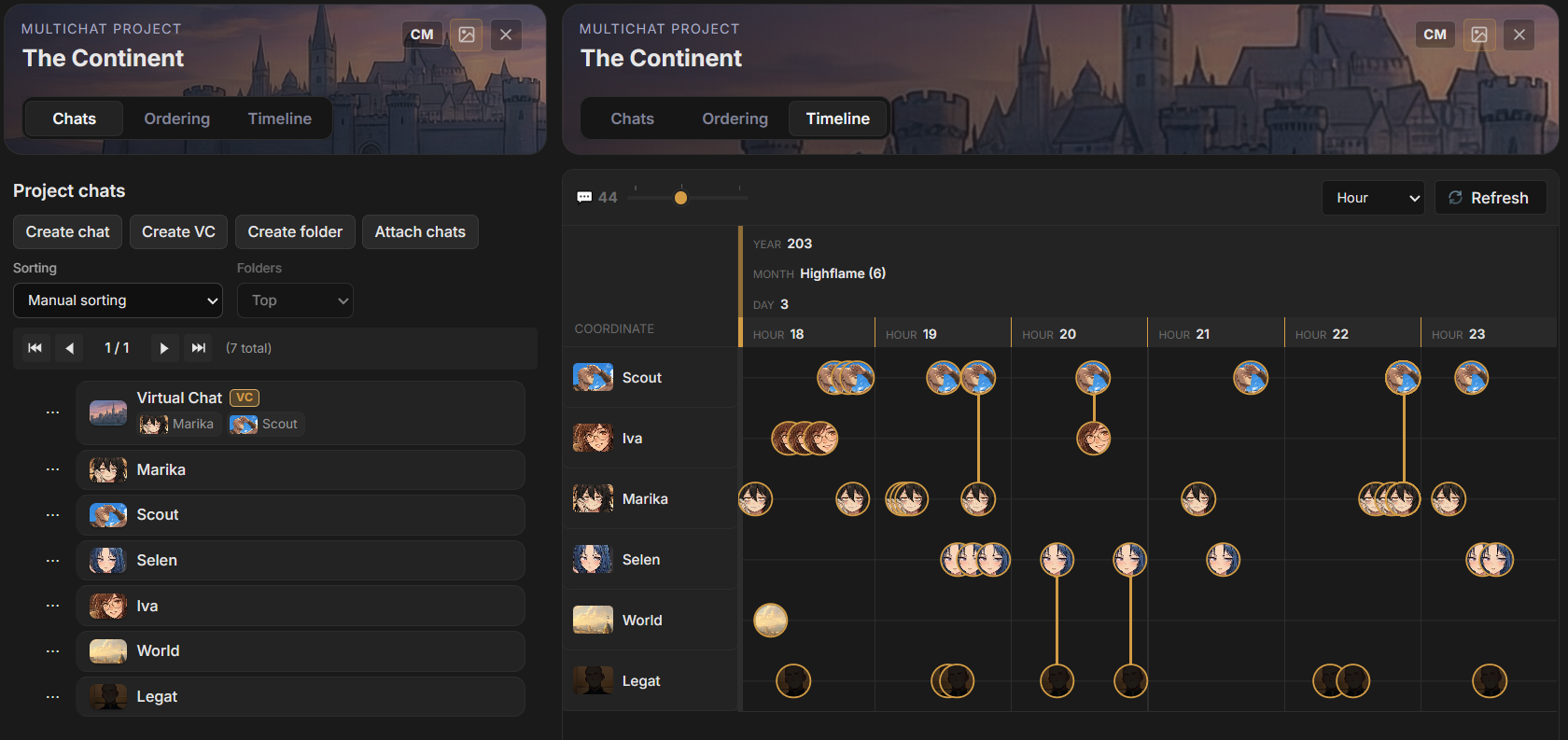
Section titled “How TavernAI represents it”A MultiChat Project holds the chats that belong to the same story, campaign, or world. Each chat keeps its own participants, messages and branches.
The project adds three working views:
- Chats organizes the regular and virtual chats in the project.
- Ordering defines the coordinates attached to new messages, such as a date, chapter, turn, or custom sequence.
- Timeline places messages from all project chats on one ordered view.
The Multichat model
Section titled “The Multichat model”MultiChat Project
Section titled “MultiChat Project”A project is a collection of chats. Attaching a chat does not merge it or move it out of the main chat library. The same chat remains available as an ordinary chat and becomes a member of the project.
Regular chat
Section titled “Regular chat”A regular chat owns its messages and participants. It can be used directly, included in the project timeline, or added as a source of a Virtual Chat.
Virtual Chat
Section titled “Virtual Chat”A Virtual Chat is a live combined view of messages from selected regular chats. It does not duplicate those messages. Its source controls determine which chats appear in the view, contribute context, and receive new messages.
Ordering Format
Section titled “Ordering Format”An Ordering Format describes the values written to messages and how those values are displayed and sorted. A format can represent Gregorian dates, fictional calendars, chapters and scenes, turns, absolute day numbers, or another ordered coordinate system.
Each message keeps the ordering values written when that message was created. Changing the current project value affects later messages, not the stored values on earlier messages.
Timeline
Section titled “Timeline”The Timeline reads the active message path from every regular chat in the project and groups those messages by the project’s current Ordering Format. Each chat receives its own lane. A message shared by several chats appears across the corresponding lanes.
Create a Multichat project
Section titled “Create a Multichat project”- Open Projects in the library panel.
- Select Create project.
- Open the new project from MultiChat Projects.
- Rename the project by selecting its name in the composer header.
- Add existing chats or create new chats inside the project.
The project composer opens automatically when a project is selected.
A basic workflow
Section titled “A basic workflow”- Create a project for one story or campaign.
- Attach the regular chats that represent its locations, groups, or parallel scenes.
- Open Ordering and select an Ordering Format.
- Set the current project value before writing the next part of the story.
- Write messages in the regular chats, or create a Virtual Chat to work across several chats at once.
- Open Timeline to inspect the combined sequence.
Multichat pages
Section titled “Multichat pages”- Projects and chats covers project membership, chat organization, covers, and deletion behavior.
- Virtual Chats covers source chats, context, write targets, rebuilds, and snapshots.
- Ordering Formats covers fields, templates, sort rules, calendar semantics, and message values.
- Timeline covers lanes, coordinates, scales, shared messages, and Unplaced messages.
- Sharing messages covers placing one message in another project chat.