
Ordering Formats
Dieser Inhalt ist noch nicht in deiner Sprache verfügbar.
An Ordering Format defines structured coordinates for Multichat messages. A coordinate can be a date, chapter and scene, turn number, world age, absolute day, or another sequence that fits the project.
The format defines the shape of the data. The project or chat holds the current values. Each new message receives a frozen payload built from the effective values at creation time.
Format, current value, and message payload
Section titled “Format, current value, and message payload”These are separate layers:
| Layer | Stored information | What changes it affects |
|---|---|---|
| Ordering Format | Fields, templates, sort profile, and optional semantics | How values are entered, displayed, and sorted |
| Project value | Current values for one format in one project | Later messages using project scope |
| Chat value | Current values for one format in one chat | Later messages using chat scope |
| Message payload | Frozen fields and derived values | That message only |
Changing a format or the current project value does not rewrite earlier message payloads.
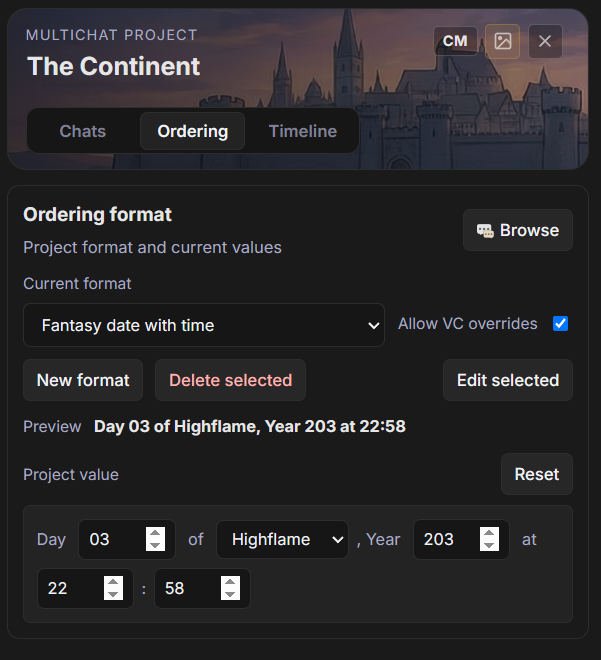
Select the project format
Section titled “Select the project format”- Open a MultiChat Project.
- Open Ordering.
- Choose a format under Current format.
- Set the Project value.
The Preview shows the display line that will be written from the current values. Reset restores the format defaults for the project value.
No format removes the current project selection. It does not delete the format from the library.
Screenshot
Create a format
Section titled “Create a format”Select New format. Start from one of the templates, give the format a name, then configure its fields and sort profile.
The editor saves an existing format as it changes. A new format is created when Create is selected.
Fields
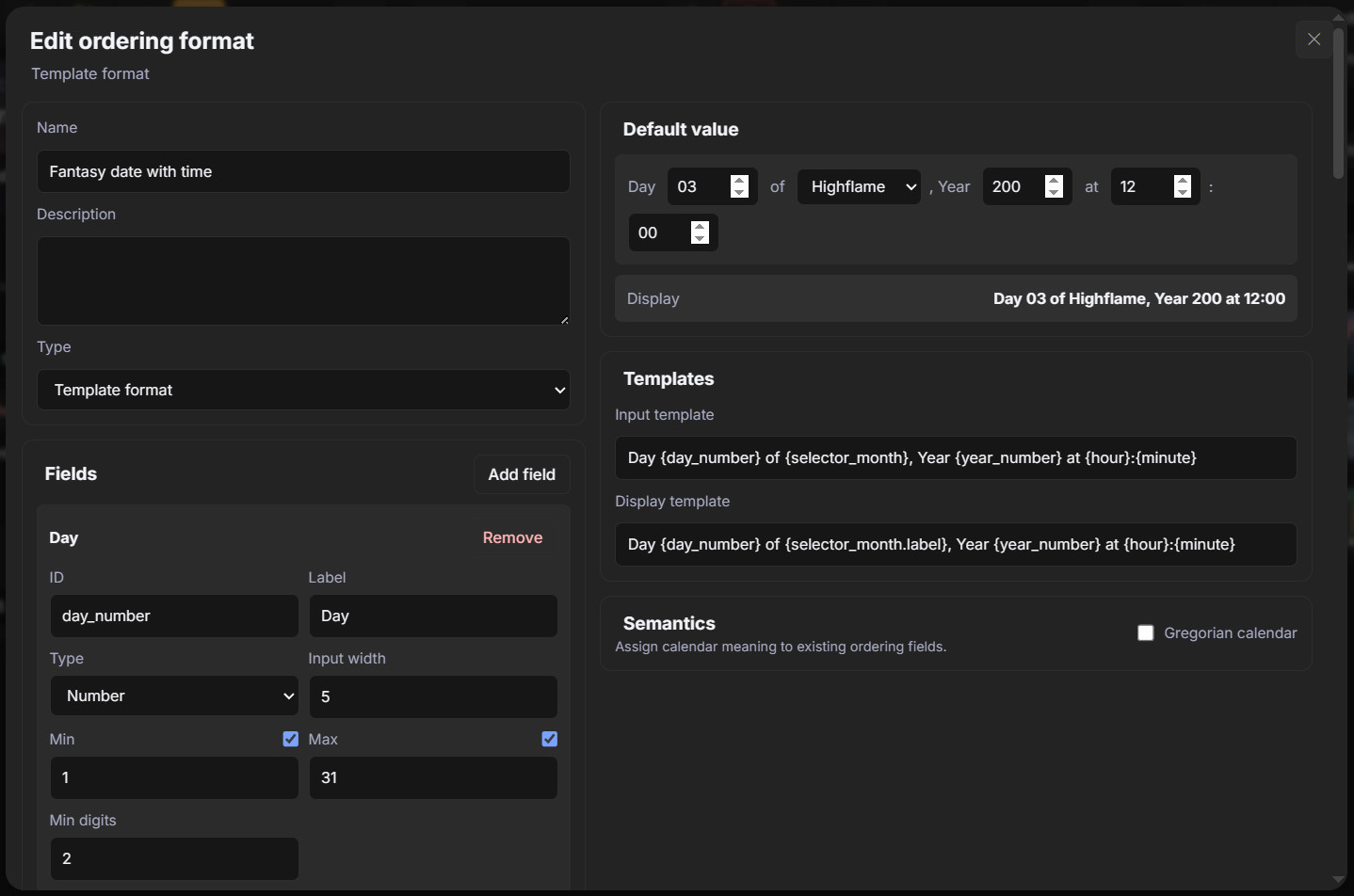
Section titled “Fields”Every field has a stable ID, a visible Label, and one of three types:
- String stores free text.
- Number stores a numeric coordinate and can enforce minimum, maximum, and minimum digit display.
- Selector stores a value selected from named options.
Field IDs are used by templates and sort parts. Keep them short and descriptive, such as year, month, day, chapter, or turn.
The Default value section defines the initial values for new project and chat state. It is part of the format definition, not the current value of every project.
Templates
Section titled “Templates”The Input template controls the line used when ordering data is written into generation input. The Display template controls previews and message badges.
Insert fields with braces:
Year {year}, Month {month}, Day {day}Selectors can expose their stored value or visible label:
{month.value}{month.label}Sort profile
Section titled “Sort profile”The sort profile controls chronological or sequential comparison. It is independent from the display template.
Typed parts compares fields from top to bottom. A date usually sorts by year, then month, then day. Numbers are compared numerically and strings as text.
String key builds one text key from a template. Use it only when lexical ordering matches the intended sequence.
For nested numeric ranges, Contains range tells the Timeline that one unit contains the full range of another unit. A year can contain months, and a month can contain days. This enables hierarchical scales and elapsed-gap labels.
Screenshot
Gregorian calendar semantics
Section titled “Gregorian calendar semantics”Enable Gregorian calendar when three existing fields represent a Gregorian year, month, and day.
Map:
- Year field to a Number field;
- Month field to a Number field or numeric Selector with values
1through12; - Day field to a Number field.
Calendar semantics validates real Gregorian dates, including month lengths and leap years. Missing or invalid dates become Unplaced on the Timeline.
BCE and CE
Section titled “BCE and CE”Use BCE/CE era notation stores BCE years as negative values and CE years as positive values. Year zero is invalid. The display template renders the absolute year magnitude with the configured era label.
Day cycles
Section titled “Day cycles”A day cycle derives a repeating label such as a weekday from the format’s day coordinate.
With Gregorian semantics, TavernAI calculates the day coordinate from the mapped date. Without it, select a fixed calendar calculation or an Absolute day field that increases by one each day.
Derived cycle values are frozen into each message payload. Changing a cycle later does not recalculate labels already stored on messages.
Write ordering data to messages
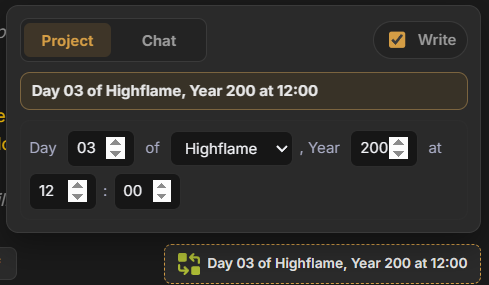
Section titled “Write ordering data to messages”Open Chat settings for a project chat and enable Show virtual ordering control. The ordering control appears near the message input.
The control has two scopes:
- Project uses the project’s current format and project values.
- Chat uses a format override and values stored for that chat.
The Write toggle controls whether the effective ordering line and payload are attached to new messages. Values are saved independently for each format and scope.
Swipes and generated replies snapshot the effective values when their message record is created. Later input changes do not move those messages.
Screenshot: Ordering input control.
Inspect or repair message data
Section titled “Inspect or repair message data”Enable Show message virtual ordering badges in Chat settings to show the stored coordinate under each message.
Selecting a badge opens the message payload as JSON. This editor can repair or remove data on an individual message, but it does not apply the Ordering Format editor’s field validation. Use it for targeted corrections and preserve the existing payload structure.
Format library and deletion
Section titled “Format library and deletion”Browse opens the Ordering Format library. Formats can be organized into folders and reused by several projects and chats.
Delete selected deletes the format itself. Existing message payloads remain stored, but projects or chats that selected the deleted format can no longer use it for new values. Select another current format after deletion.