
Prompt Caching
Это содержимое пока не доступно на вашем языке.
Prompt caching reduces the cost of API generations by letting a provider reuse an unchanged prefix from an earlier request. Providers that charge less for cached input can process long chats and stable instruction blocks without billing every repeated token at the full input rate.
Caching does not remove content from the prompt. TavernAI assembles the same roles, text, attachments, and order, then marks an eligible prefix according to the selected provider and model.
Provider billing, minimum prefix size, retention time, and cache-write reporting differ. The usage shown by TavernAI reflects the values returned by the provider.
Enable prompt caching
Section titled “Enable prompt caching”Open the AI Generation Settings for the text-generation model and find Prompt Caching. The section appears only when the selected provider, endpoint, and model advertise a supported caching path.
Turn on Enable Prompt Caching, then choose the available Mode:
- a provider-managed mode caches the full eligible prompt according to provider rules;
- a TavernAI-managed mode can place a cache breakpoint at a stable prompt boundary;
- manual mode lets you choose that boundary in Prompt Preview.
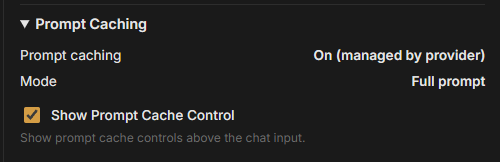
Some models show On (managed by provider) and Full prompt instead of editable breakpoint controls. In that mode, the provider decides which prompt prefix is reused.
Compatible Gemini models on Google AI and Google Vertex AI use this provider-managed mode. TavernAI reports the cache usage returned by the provider; manual cache breakpoints are not available for these connections.
Merged Boundary controls how a manual breakpoint interacts with entries combined by Prompt Manager merge groups. Keep the default unless a specific merged prompt needs a different boundary policy.
Screenshot:
Set a manual breakpoint
Section titled “Set a manual breakpoint”A breakpoint marks the end of the reusable prefix. Content before it should stay stable between requests; frequently changing chat history should usually remain after it.
- Select a TavernAI-managed manual caching mode.
- Open Prompt Preview.
- Find the final prompt entry that should belong to the stable prefix.
- Select Set cache breakpoint after.
The chosen boundary changes to Cache breakpoint set. The manual cache section reports one of these states:
| State | Meaning |
|---|---|
| Not set | The current chat has no saved manual breakpoint. |
| Set · ready | The saved boundary exists in the current assembled prompt and can be applied. |
| Set · cannot be applied | The saved boundary is unavailable or does not satisfy current caching rules. |
Select Remove to clear it.
Breakpoints belong to the current chat. They follow stable Prompt Manager segments rather than a raw line or array position, so ordinary prompt growth after the boundary does not move them arbitrarily.
Choose the boundary
Section titled “Choose the boundary”A useful cache prefix usually contains content that is large and changes rarely:
- system instructions;
- stable Prompt Manager items;
- Card descriptions and rules;
- older chat history that no longer changes.
Keep rapidly changing content after the breakpoint when possible:
- the newest messages;
- timestamps and random macros;
- dynamic PM Script output;
- prompt items that change every generation.
Show cache usage in chat
Section titled “Show cache usage in chat”Enable Show Prompt Cache Control in model settings. A Cache control appears above the chat message input field.
After generation, the panel identifies the provider and model used for that request and can show:
- total input tokens;
- cache-read tokens and percentage;
- cache-write tokens when the provider reports them;
- uncached input tokens;
- active mode, status, and reason;
- generation time associated with the usage record.
The first request for a new prefix may write a cache without reading from it. A later request can report a cache read if the provider still retains the prefix and the content before the boundary remains byte-for-byte eligible under that provider’s rules.
Related pages
Section titled “Related pages”- Prompt Manager for tree order, merge groups, dynamic items, and prompt assembly.
- Advanced features for Final Prompt Viewer and request records.